
Have you ever wondered why some job applications get noticed while others are ignored? When sending a resume by email, what you say can make all the difference.
Email is often the first way employers interact with you. It’s not just about attaching your resume; your email shows your professionalism and communication skills. A poorly written email can ruin your chances, even with a great resume.
A well-crafted email complements your resume. It sets the tone, grabs attention, and shows that you care about the opportunity. It’s your first chance to impress and stand out.
Why Email Matters in Job Applications
Email is a vital part of job applications. It is often the first impression you make on employers. A well-written email can help you stand out when sending resume by email what to say in email.
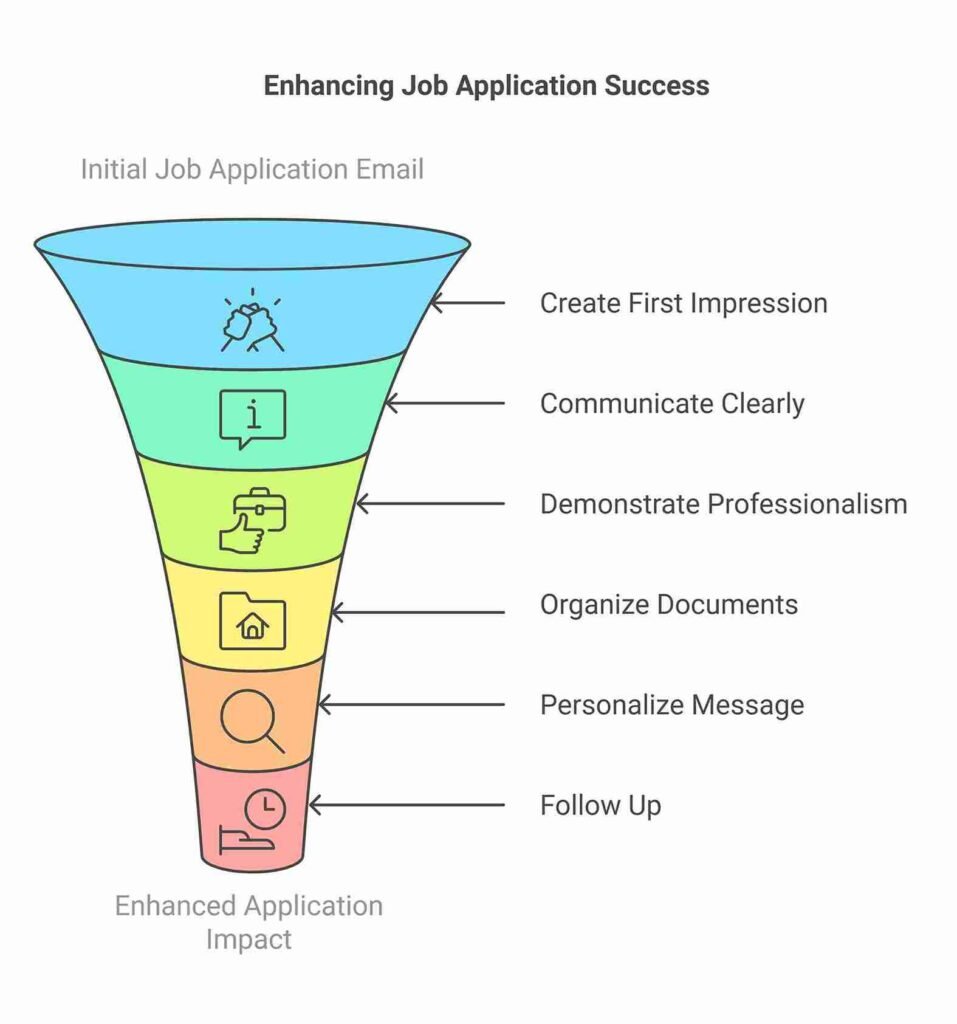
It can show your professionalism and communication skills. Here are some key reasons why email matters:
- First Impressions Count: Your email is the first thing employers see. A polite and professional email creates a good first impression. It shows that you take the job seriously.
- Clear Communication: Emails let you clearly explain your interest in the job. You can also highlight your strengths. A clear and simple email makes it easier for employers to understand your message.
- Show Professionalism: Using proper language and format shows that you are professional. Avoid slang, emojis, or casual words. This builds trust and respect.
- Organize Your Application: Emails help you attach and send your resume and cover letter. Make sure all your documents are named properly. A neat email makes your application easier to review.
- Stand Out from the Crowd: A personalized email can make you stand out. Mention the company’s name or something specific about the job. This shows you have done your research.
- Follow Up: Emails allow you to follow up after sending your application. A short follow-up email shows interest and keeps you on the employer’s mind.
Using email correctly is important. It shows employers that you are serious, professional, and ready to work. Always proofread your emails and double-check for mistakes. A good email can be the key to your dream job.
When Sending Resume by Email What to Say in Email
Sending your resume by email is an important step in applying for a job. But what should you write in the email?
A simple, clear message can make a great impression. It can show your professionalism and interest in the job. Here are some tips and examples for different scenarios:
Start with a Polite Greeting
Always start your email with a polite greeting. Use the recipient’s name if you know it. If you don’t, write “Dear Hiring Manager” or “Dear [Company Name] Team.”
Example:
“Dear Mr. Smith,”
“Dear Hiring Manager,”
Introduce Yourself
Briefly introduce yourself and mention the job you’re applying for. Keep it short and clear.
Example:
“My name is John Doe. I am applying for the position of Marketing Assistant as advertised on your website.”
Explain Why You’re Sending the Email
Tell them you’re attaching your resume for their review. Mention any other documents you’ve included, like a cover letter or portfolio.
Example:
“I am attaching my resume and cover letter for your consideration. Please let me know if you need any additional information.”
Highlight Your Interest
Show that you’re interested in the job and the company. Mention something specific that excites you about the role.
Example:
“I am very interested in this role because your company values creativity and innovation, which align with my skills and goals.”
Add a Polite Closing
End your email with a polite and professional closing. Thank them for their time and express your hope for a response.
Example:
“Thank you for considering my application. I look forward to the opportunity to discuss how I can contribute to your team.”
Check for Mistakes
Before sending your email, proofread it. Check for spelling mistakes or missing attachments.
Example:
“Please confirm that you’ve received my email. I am happy to provide more details if needed.”
Using clear and polite language in your email can make a big difference. It shows respect and professionalism. Always remember to double-check everything before hitting send!
Common Mistakes to Avoid While Writing a Job Email
Writing a job email is an important step in getting noticed by employers. But many people make mistakes that hurt their chances. Avoiding these mistakes can help you make a great impression. Here are common mistakes you should avoid:
Using an Unprofessional Email Address
Your email address should look professional. Avoid funny, casual, or nickname-based addresses. Use a simple format with your name.
Example:
- Good: john.doe@gmail.com
- Bad: coolguy123@gmail.com
Skipping the Subject Line
Never send an email without a subject line. A clear subject line tells the employer what your email is about. Keep it simple and direct.
Example:
- Good: Application for Marketing Assistant Position
- Bad: Hi or No Subject
Not Addressing the Recipient Correctly
Always greet the recipient by name if you know it. If not, use a formal greeting like “Dear Hiring Manager.” Avoid casual greetings like “Hey.”
Sending an Email Without Proofreading
Mistakes in grammar or spelling make you look careless. Always double-check your email before sending. Use online tools if needed.
Attaching the Wrong File
Check your attachments carefully. Make sure you’re sending the right resume and other documents. Name your files clearly.
Example:
- Good: John_Doe_Resume.pdf
- Bad: Resume_Final123.pdf
Writing a Long or Unclear Message
Keep your email short and clear. Don’t include too much information or long stories. Employers appreciate simple and direct communication.
Example:
- Good:
“I am applying for the Marketing Assistant position. I have attached my resume and cover letter for your review.”
Avoiding these mistakes can improve your chances of success. A well-written email shows you are professional and serious about the job.
Sample Email Template
Here is a sample Email Template for Sending a Resume
Subject: Application for [Job Title]
Dear [Recipient’s Name or Hiring Manager],
My name is [Your Name], and I am excited to apply for the [Job Title] position at [Company Name]. I came across this opportunity on [Job Board/Company Website], and I believe my skills and experience make me a strong fit for this role.
I have attached my resume [and cover letter] for your review. My background in [Your Field or Key Skill] and my experience with [Specific Achievement or Role] have prepared me well for this position. I am particularly drawn to [mention something specific about the company or role that excites you].
Please let me know if you need any additional information. I would be happy to provide further details or answer any questions you may have.
Thank you for considering my application. I look forward to the opportunity to contribute to [Company Name].
Best regards,
[Your Full Name]
[Your Contact Information]
[Optional: LinkedIn Profile or Portfolio Link]
How to Use This Template:
- Replace placeholders like [Your Name], [Job Title], and [Company Name] with the correct details.
- Keep it short and clear. Avoid unnecessary details.
- Double-check spelling, grammar, and attachments before sending.
This template ensures your email is professional, polite, and effective. Don’t forget to read our blog on what to write on Boss Day in your free time.
FAQs – When Sending Resume by Email What to Say in Email
Use their name if you know it. If not, write “Dear Hiring Manager” or “Dear [Company Name] Team.” Avoid casual greetings like “Hi” or “Hey.”
Yes, let them know you’ve attached your resume (and cover letter, if included). Example: “I have attached my resume and cover letter for your review.”
It’s better to attach your resume as a file. Use the email body to write a professional message about your application.
Keep it short and to the point, ideally 3-4 sentences. Employers appreciate clarity and brevity.
End Note
When sending resume by email what to say in email matters as much as your resume itself. Always be polite, clear, and professional. Start with a proper greeting, introduce yourself, and explain the purpose of your email. Highlight your interest in the role and attach the correct files.
Avoid common mistakes like typos or unprofessional language. A concise and well-written email creates a strong impression and increases your chances of success. Double-check everything before hitting send.